
SaaS LMS Pricing: What It Costs and What's Included

SaaS LMS PRICING MODELS - WHICH ONE FITS YOUR ORGANIZATION?
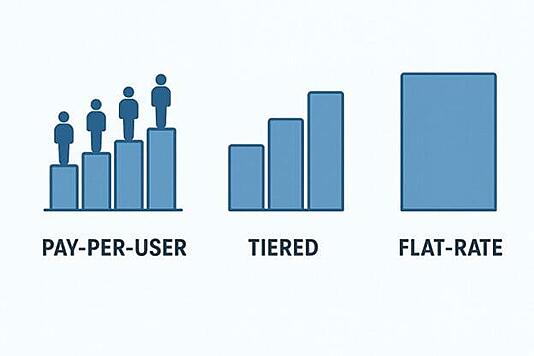
There's no single right pricing model for every organization. The best fit depends on how many people need access, whether your user count fluctuates, and how predictable you need your training budget to be. EdTek offers three models so you can choose the one that works for how you actually operate.
PAY-PER-USER PRICING
With pay-per-user pricing, you pay a fixed fee for each user who accesses the LMS. This is the most flexible model — you only pay for active users, which makes it a practical choice for organizations where the number of learners changes throughout the year, or where training is delivered to rotating groups of employees, customers, or members.
It's also a lower-risk way to start. You're not committing to a flat annual fee before you know exactly how many people will use the platform.
TIERED PRICING
With tiered pricing, you purchase access in blocks of users — typically starting at 100 — and add blocks as your needs grow. This model gives you the predictability of a fixed cost while still allowing your program to scale mid-year without renegotiating your contract.
For most small and mid-size organizations, tiered pricing is the right balance. You know what you're paying, you have room to grow, and you're not paying for more than you need on day one.
FLAT-RATE ANNUAL LICENSE
With flat-rate pricing, you pay a single annual fee for a fixed number of users and everything that comes with it — the full platform, all support services, and all included courses. Nothing is metered, nothing is variable. It's the simplest model to budget for, and it works well for organizations that have a stable user base and want complete predictability over a multi-year contract.
EdTek guarantees your price for the full term of your contract and limits renewal increases to no more than 3–5%. You won't open a renewal invoice and find the price has jumped.
WHAT'S INCLUDED IN EVERY EDTEK PRICING PLAN
THE REAL COST OF LMS SOFTWARE: WHAT TO WATCH FOR?
The sticker price of an LMS is rarely the full cost. When you're doing an LMS pricing comparison across vendors, these are the line items that often don't appear on the initial quote:
Implementation and setup fees. Some vendors charge a one-time fee just to get your environment configured. Ask specifically whether setup is included.
Support tier costs. The support you actually need — a dedicated contact, phone access, help for your learners — is often a paid upgrade. Add the realistic support cost to the monthly platform price before comparing.
Training costs. If administrator and instructor training is only included for 30 or 60 days, factor in what ongoing training will cost over a two or three-year contract. People forget things. New staff join. That training value disappears fast.
Course library access. Many platforms have a course library. Not all of them include it at the base price. Ask whether soft skills or compliance content is included in the plan you're being quoted, or whether it's a separate subscription.
Annual price increases. Ask what happens at renewal. Some vendors offer attractive first-year pricing and increase rates significantly in future years. EdTek caps contract renewal increases at 3–5%.
When you add up what's missing from a lower-cost platform's base price, the LMS software pricing comparison often looks very different from what it did on first glance.
FLEXIBLE LMS PRICING BUILT FOR SMALLER ORGANIZATIONS
HOW EDTEK'S LMS SERVICES PACKAGE PRICING WORKS
SaaS LMS PRICING NEWS
Expert Review: The Real Cost of LMS Software
The Cost of LMS Software Explained
Click here to learn more about the different LMS software pricing models. Understand the differences between User-Based models like Pay-per-User and Pay-per-Active-User, Tiered and Flat-Rate pricing, Usage-Based options like Pay-as-You-Go, and ownership models including Perpetual Licenses and Open-Source solutions.

